
Complete Ductless Mini‑Split Site Surveys in 20 Minutes with 3D + AR
A step‑by‑step mobile workflow for HVAC techs: use smartphone AR + real‑time 3D to capture measurements, produce instant branded quotes, and schedule installs — all in ~20 minutes.
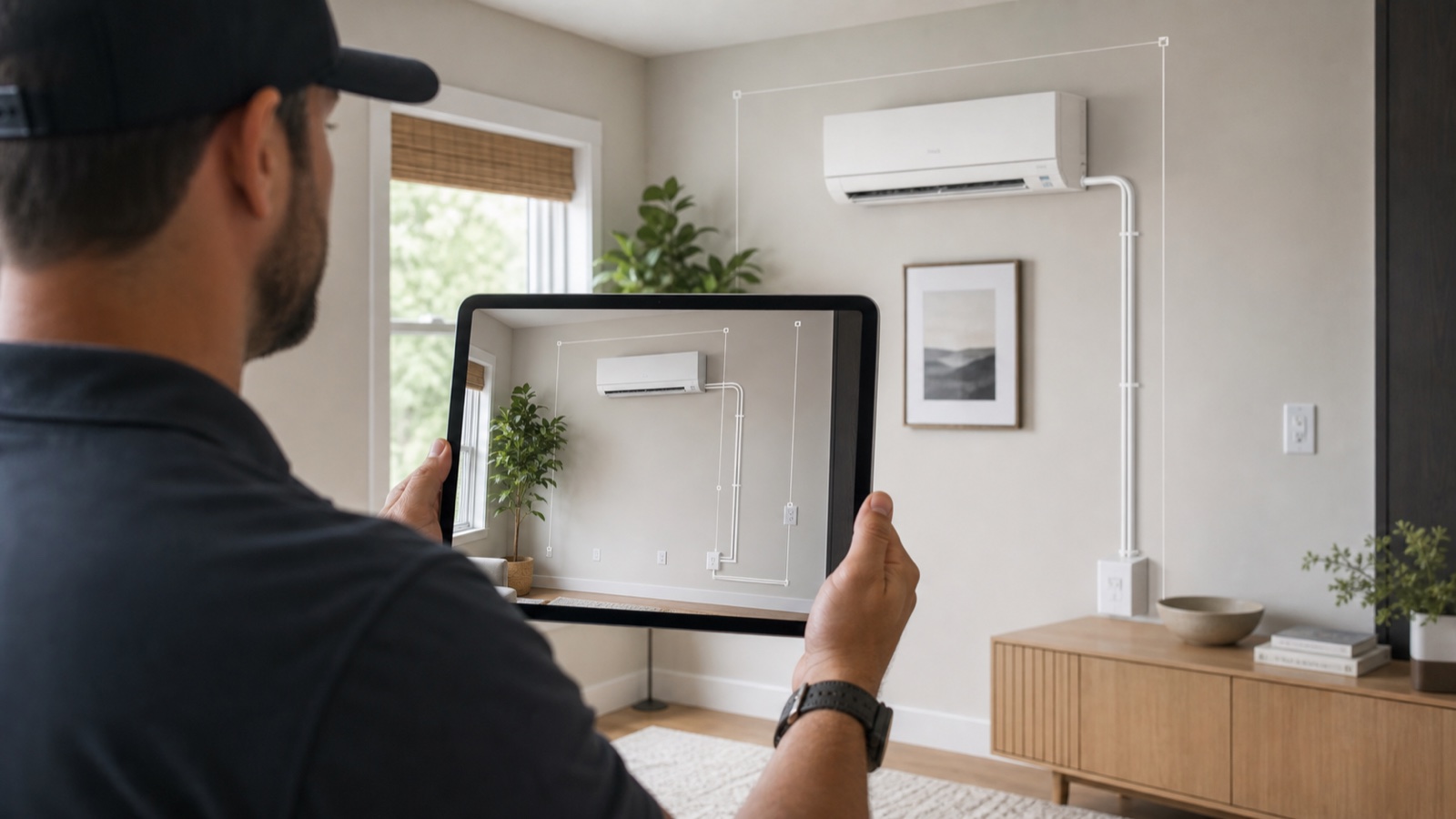
Table of contents
- Why cutting site‑survey time matters for ductless AC installers
- What a modern 3D+AR site survey looks like (high level)
- 20‑minute mobile site survey: step‑by‑step (practical)
- Capture checklist for accurate measurements
- What to validate before leaving the site
- How Configurix makes this a reality (concrete features and workflow)
- Best practices for implementation and training
- Quick ROI example (conservative)
- Final checklist: what your tech app must do
- Next steps — test the workflow in your operation
Why cutting site‑survey time matters for ductless AC installers
A fast, accurate site survey is the single biggest bottleneck for ductless (mini‑split) installers. Long site visits add labor cost, delay quotes, and increase the chance of missed details that lead to callbacks and rework. At the same time, customers expect quick answers — a branded quote and a clear install date — or they move on.
Augmented reality (AR) and mobile 3D capture are no longer experimental: studies and field reports show AR raises buyer confidence and engagement, and mobile photogrammetry on modern phones is accurate enough for many small‑scale building measurements when operators follow a simple capture protocol. (phys.org)
This post gives a practical, technician‑tested workflow that turns a web or phone lead into an installer‑ready site survey, a permit‑aware quote, and an e‑signed order — all in about 20 minutes using a single platform.
What a modern 3D+AR site survey looks like (high level)
A modern workflow combines four capabilities into a single mobile session:
- AR-assisted photo capture of the installation elevation and surroundings (to check clearances, mounting surfaces and condensate routing). (isprs-annals.copernicus.org)
- Local photogrammetry or depth capture to estimate key linear dimensions (wall width, eave height, clearance to ceiling). (mdpi.com)
- Real‑time 3D configuration that maps captured dimensions to available indoor/outdoor unit models, piping runs, and mounting options so automatic pricing can run immediately. (This is a CPQ pattern implemented in production tools.)
- One‑tap PDF quoting, e‑signature and calendar scheduling so the customer gets an official quote and a proposed install date before the tech leaves.
Bringing these steps together eliminates duplicate data entry, reduces measurement errors, and turns a passive inquiry into a signed job on the same day.
20‑minute mobile site survey: step‑by‑step (practical)
This section is a timed checklist you can follow on the job. Times below assume a trained technician with the right app and a modern smartphone.
| Step | Action | Time (min) |
|---|---|---|
| 1 | Quick pre‑arrive check & customer introduction (confirm units to be surveyed) | 2 |
| 2 | AR exterior capture: two orthogonal elevation photos + context panorama (roofline, condenser location) | 4 |
| 3 | Interior capture: room panorama, preferred indoor head location(s), obstruction photos | 4 |
| 4 | On‑screen measurement verification (confirm wall heights, distances) & add notes | 3 |
| 5 | Real‑time config: map captured dims to unit options, add refrigerant line length estimate, add accessories | 3 |
| 6 | Instant branded PDF quote generation and review with customer | 2 |
| 7 | E‑sign contract and pick install date (shared calendar integrated) | 2 |
| Total | 20 |
These times are achievable because the app replaces tape and repeated manual measurements with AR overlays and guided photo captures. The system uses the captured geometry to pre‑fill configuration fields and run automatic pricing rules.
Capture checklist for accurate measurements
To get reliable results from smartphone photogrammetry and AR, follow these capture best practices:
- Use steady, overlapping photos: take each panorama slowly, with 40–60% overlap between frames. Modern photogrammetry algorithms perform best with consistent overlap. (mdpi.com)
- Include a scale reference where possible (a doorway width, a ladder, or a measuring card) to ground the photogrammetry in real units.
- Capture good lighting: avoid deep shadows on the façade; a bright overcast day is ideal for exterior shots.
- Prioritise orthogonal elevations: stand directly in front of the outdoor unit location and take perpendicular photos for the cleanest plane extraction. ISPRS research shows that AR/visual feature approaches can reach sub‑percent drift under good conditions. (isprs-annals.copernicus.org)
When you build the capture UX into the technician app, these prompts are automated so techs don’t need to remember every step.
What to validate before leaving the site
Make a final 60–90 second pass on the app to confirm:
- Indoor head locations and clearance meet manufacturer minimums and local code. (Manufacturer installation guides include minimum clearances and piping/power requirements.) (daikin.rs)
- Outdoor condenser location is feasible for mounting/clearance and service access.
- Line‑set length estimator is within tolerance (auto calculated from capture + chosen indoor/outdoor positions).
- Customer has the branded PDF quote and a proposed install date on their phone or email.
These checks cut the most common causes of failed installs and permit delays.
How Configurix makes this a reality (concrete features and workflow)
Configurix is built for this exact mobile, end‑to‑end workflow for AC installers:
- Real‑time 3D engine: update a product model live as the tech selects indoor head style, orientation and colors so customers see the unit in context.
- AR on the customer's home: preview the chosen indoor head and the outdoor condenser in the customer’s real environment to confirm aesthetics and access. This reduces surprises at install.
- Automatic pricing from the live configuration: line‑set length, accessory add‑ons, and labor options feed pricing rules so quotes are consistent and margin‑protected.
- Instant branded PDF quoting: the app generates a white‑label quote with your logo and terms the moment the tech accepts the configuration.
- Digital contract signing and customer portal: customers can e‑sign on the spot or later, and the signed contract is stored with the project.
- Shared calendar & crew scheduling: once the job is signed, assign crews, reserve install windows, and notify the customer — all from the same platform.
If you want to see the AC workflow in action, explore the Configurix AC product page or learn how our pergola workflow uses the same engine for outdoor equipment. (/products/ac-configurator) (/products/pergola-configurator) Also learn more about Configurix and our company on the home page. (/)
Best practices for implementation and training
Rolling out a mobile AR + 3D configurator across a field team needs a short change plan:
- Start with a pilot team of 3–5 techs. Give them 4 hours of hands‑on training and a one‑page capture checklist.
- Lock pricing rules during pilot so sales administrators can review and tune margins before full rollout.
- Use the app’s audit trail: review captured photos and the generated 3D model for the first 20 jobs to refine prompts or add mandatory photo steps.
- Measure these KPIs during the pilot: average survey time, quote‑to‑signed conversion, first‑visit install success rate, and average days from lead to install.
Configurix includes built‑in CRM fields and analytics so you don’t need a separate reporting stack.
Quick ROI example (conservative)
A single tech who saves one hour per day on measurements and quoting can free capacity for an extra 1–2 surveys weekly — equivalent to 50–100 extra jobs a year per 5‑tech crew depending on seasonality. Because the platform produces branded PDFs and e‑signing immediately, close rates on quoting sessions also typically improve. Industry reporting on 3D/AR buyer engagement supports measurable conversion lifts when configurators replace static pages. (phys.org)
Final checklist: what your tech app must do
- Guide photo capture with prompts and overlays.
- Auto‑extract dimensions and estimate line lengths.
- Map captured geometry into a real‑time 3D configurator and run price rules.
- Produce branded PDF quotes and get signatures in the field.
- Integrate with calendar and CRM so installs are scheduled and crews assigned automatically.
Configurix already bundles all of the above into one white‑label platform so manufacturers, dealers and installers run the same workflow from lead capture to install.
Next steps — test the workflow in your operation
Book a demo of the Configurix AC configurator to see the mobile survey workflow end‑to‑end and test with your own product rules, pricing and crew calendars: /products/ac-configurator
If you want to pilot shared configuration across outdoor and indoor teams, ask about white‑label rollout and how the same engine supports pergolas, awnings and AC workflows. /products/pergola-configurator
Sources
- Augmented reality in retail and its impact on sales (Phys.org, 2021).
- A Comparative Study on the Use of Smartphone Cameras in Photogrammetry Applications (MDPI Sensors, 2024).
- Smartphone photogrammetry accuracy and field measurement studies (ScienceDirect/Elsevier, 2023).
- ISPRS Annals — Mobile mapping, AR and outdoor accuracy findings (ISPRS, 2020).
- Daikin installation manuals and commissioning checklists (manufacturer installation documentation, various years).
Ready to try Configurix?
See how the configurator, quoting and CRM work together for your business.
Book a demo →Related articles
Contratti di manutenzione per pergole: vendere servizi con 3D e AR
Come trasformare ogni preventivo per pergole e verande in un contratto di manutenzione ricorrente: processo operativo, prezzi automatici dal configuratore 3D, firma digitale e pianificazione installazioni con calendario integrato.
Costi e tempi d'installazione automatici dal configuratore 3D
Guida pratica per aziende di pergole, tende e verande: trasformare la configurazione 3D/AR in calcolo automatico di manodopera, viaggi, preventivo PDF e schedulazione installazione.
WebAR senza app: sopralluogo e preventivo rapido per pergole e verande
Guida operativa per installatori: come usare WebAR (AR via browser) per sopralluoghi remoti, preventivi immediati e firma digitale. Setup tecnico, limiti, checklist e flusso lead‑to‑install.