
Fence and Gate Configurator Software: Plan, Price and Quote Custom Projects
Learn what fence and gate configurator software must calculate—from run length and posts to sliding gates, motors, live prices, quotes and material lists.
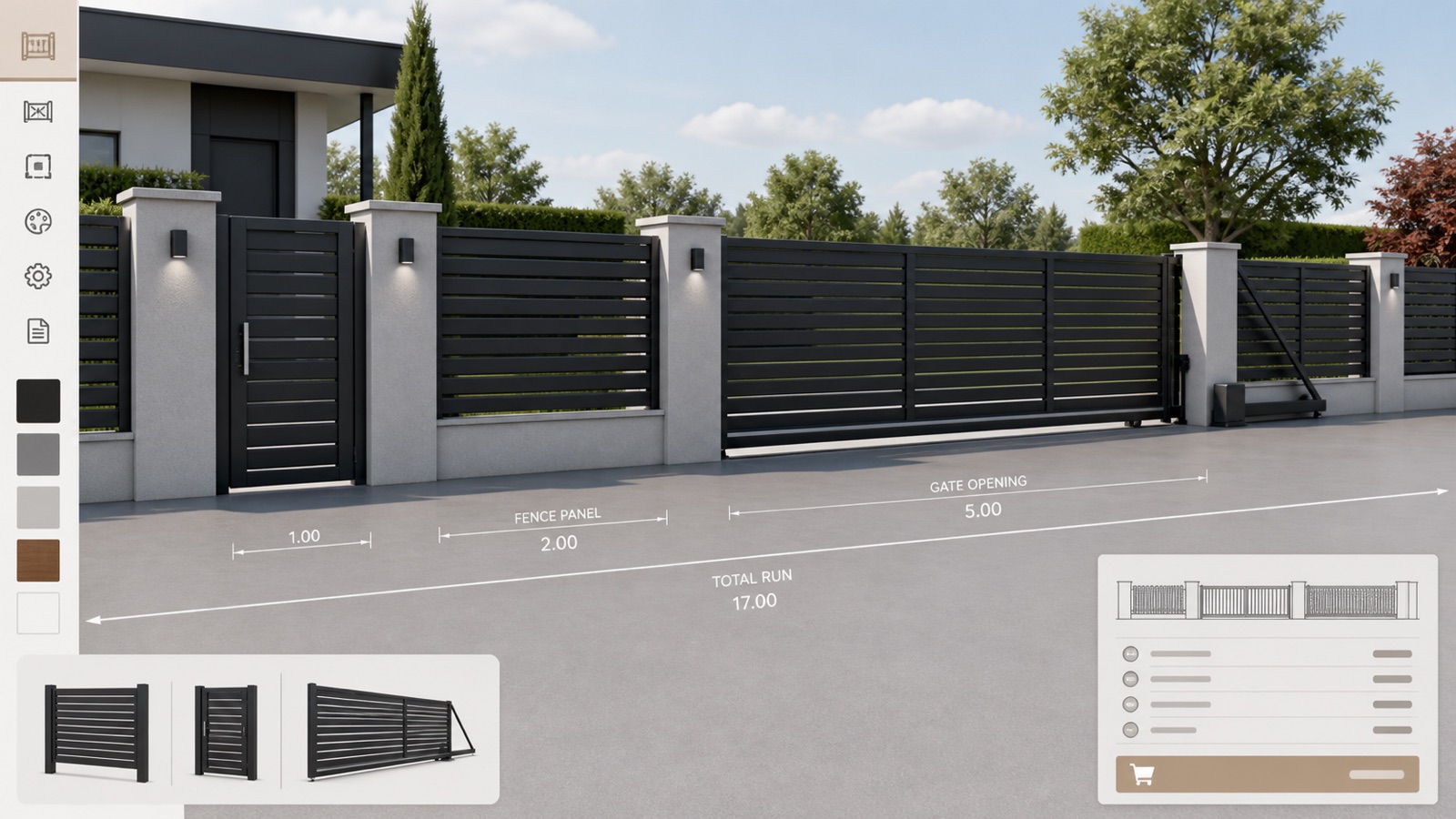
Table of contents
- Why generic drawing tools are not enough
- The configuration data a fence project needs
- Run length and segments
- Panel module and post logic
- Height, infill and finish
- Pedestrian gates
- Sliding and swing driveway gates
- Terrain and installation
- How live fence pricing works
- Automatic material lists and order data
- A stronger website lead than “contact us”
- Questions to ask before choosing software
- Configurix fence and gate configurator
- Frequently asked questions
- Can a fence configurator calculate panel and post quantities?
- Can customers draw the boundary themselves?
- Can the system price installation?
- Can dealers receive their own prices and documents?
Fence and gate configurator software turns a property layout into a valid, priced project. The customer or salesperson defines the run, selects panels, posts and gates, and sees the result in 2D or 3D. The same configuration can then create a quote, material list and project record.
This matters because fence projects are rarely a single product with a single price. Total run length, corner conditions, ground changes, panel widths, posts, infill, pedestrian access, driveway gates, automation and installation all affect the result.
Why generic drawing tools are not enough
A drawing tool can show a fence line. A fence CPQ configurator must also answer commercial and technical questions:
- How many full panels and cut panels are required?
- Where are end, intermediate and corner posts placed?
- Which gate sizes are available for this system?
- Is a sliding or swing gate compatible with the opening and site?
- Which motor, safety and control accessories are required?
- What should be quoted for material, installation and delivery?
- Which specification should be passed to ordering or production?
When those answers live in separate spreadsheets and product manuals, salespeople spend time translating a simple customer request into a buildable project.
The configuration data a fence project needs
Run length and segments
The configurator should support one or more connected fence runs, not only a straight decorative sample. Each segment may have a different length, direction or product family. Corners, transitions and boundaries must remain clear.
Panel module and post logic
Panel width determines quantity and where a cut or custom panel is required. Post type depends on location: start, end, intermediate, corner, gate or wall connection. The material list should follow that placement logic.
Height, infill and finish
Available heights may vary by panel family and local product catalogue. Infill can include horizontal slats, vertical bars, composite boards, glass or privacy panels. Frame and infill colours may have separate rules and prices.
Pedestrian gates
The configuration must store gate width, height, handing, latch, lock, closer, hinges and posts. A customer-facing preview should make the opening direction understandable without exposing unnecessary production detail.
Sliding and swing driveway gates
Driveway gates introduce opening clearance, leaves, track or cantilever hardware, motor, controls, safety edges, photocells and foundation requirements. Rules should connect the selected gate with the components required to sell it correctly.
Terrain and installation
Slopes, steps, wall connections, excavation, foundations and access can change feasibility and price. A configurator can collect these conditions and apply defined rules, but unusual sites may still require technical review. The system should flag that review instead of pretending every project is automatic.
How live fence pricing works
Fence pricing can combine quantity-based materials and project-level costs. A controlled calculation may include:
- panels by module or measured length;
- post types and caps;
- gates and hardware packages;
- motors, controls and safety accessories;
- finish or colour surcharges;
- foundations, excavation and installation labour;
- delivery zone, tax and dealer margin;
- minimum project or setup charges.
The customer does not need to see every internal line. The sales team does need a traceable calculation that matches the approved price rules.
Configurix keeps the price attached to the same project the customer sees. If the run length, gate or finish changes, the quote can recalculate without rebuilding the job in a spreadsheet.
Automatic material lists and order data
A reliable fence configuration can produce quantities for panels, posts, caps, brackets, fixings, gate hardware, automation and accessories. For standard systems, this becomes a useful bill of materials. For made-to-measure manufacturing, additional cut, fabrication or engineering outputs can be scoped.
The important principle is one source of project data. The drawing, quote and order record should not disagree because they were typed separately.
A stronger website lead than “contact us”
A generic contact form tells the sales team very little. A fence configurator enquiry can include:
- selected fence and gate families;
- approximate run lengths and heights;
- gate type and opening;
- finish and accessories;
- indicative project price or price range;
- site postcode, timeline and contact details;
- saved configuration link or project image.
That gives the salesperson useful context before the first call. It also lets the customer invest in a design instead of sending a vague request to several suppliers.
Questions to ask before choosing software
- Can it configure multiple connected runs and corners?
- Does it calculate panels and posts from real module rules?
- Can it handle pedestrian, sliding and swing gates?
- Are gate automation and safety accessories rule-driven?
- Can unusual conditions trigger technical review?
- Does the live price use our product and installation rules?
- Can one configuration create a quote and material list?
- Can dealers use different prices, branding or territories?
- Is the configurator usable on a phone, tablet and showroom screen?
- Can our team maintain the catalogue after launch?
Configurix fence and gate configurator
The Configurix Fence and Gate Configurator can be built around your panels, posts, gates, dimensions, colours, accessories and pricing. Customers, dealers and sales teams can work from the same controlled product model while the output remains connected to quoting and project handoff.
Configurix also supports white-label branding, multiple languages, regional price logic and integration planning for CRM or ERP systems.
Book a fence and gate configurator demo to review a representative product system and map the rules required for a working first release.
Frequently asked questions
Can a fence configurator calculate panel and post quantities?
Yes, when the catalogue’s module and placement rules are defined. The output should be verified against known example projects before release.
Can customers draw the boundary themselves?
Yes. The user experience can support approximate planning, while your process can require a final site measure before production or installation.
Can the system price installation?
Yes. Installation can be calculated using length, components, ground conditions, zones or defined labour rules. Complex sites can be routed for review.
Can dealers receive their own prices and documents?
Yes. A white-label dealer workflow can apply permissions, dealer price levels, branding and regional rules from one controlled product catalogue.
Ready to try Configurix?
See how the configurator, quoting and CRM work together for your business.
Book a demo →Related articles
Contratti di manutenzione per pergole: vendere servizi con 3D e AR
Come trasformare ogni preventivo per pergole e verande in un contratto di manutenzione ricorrente: processo operativo, prezzi automatici dal configuratore 3D, firma digitale e pianificazione installazioni con calendario integrato.
Follow-up omnicanale per pergole: dal 3D alla firma in 7 giorni
Come trasformare un lead web in un ordine firmato in una settimana: configuratore 3D/AR, preventivo PDF brandizzato, automazioni email/SMS/WhatsApp, CRM e calendario di installazione in un unico flusso.
Costi e tempi d'installazione automatici dal configuratore 3D
Guida pratica per aziende di pergole, tende e verande: trasformare la configurazione 3D/AR in calcolo automatico di manodopera, viaggi, preventivo PDF e schedulazione installazione.